Steps to Delete Your Account
Step 1. Log in to your account at https://v2.fastddns.net/member.
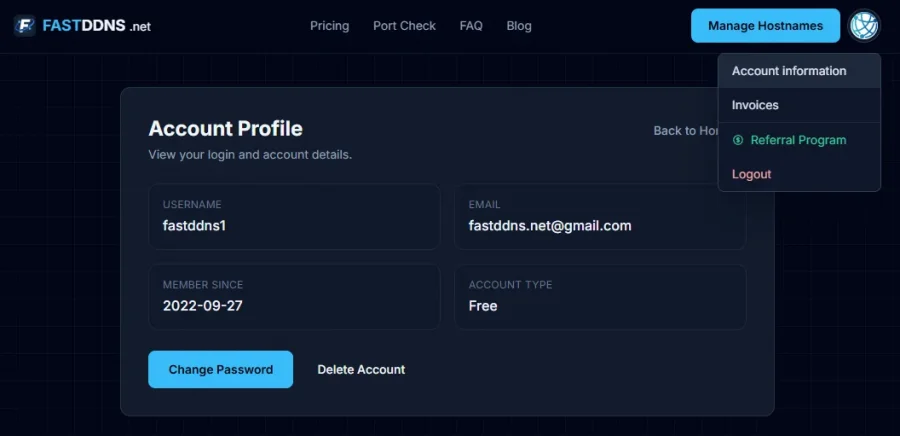
Step 2. Click your profile avatar in the top-right corner and select Account Information from the dropdown menu.
Step 3. On the Account Profile page, click the Delete Account button located next to the "Change Password" button.
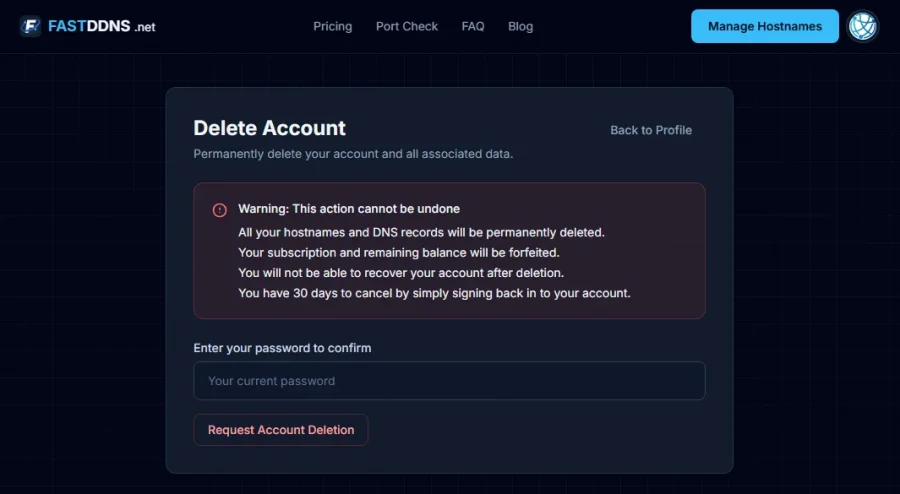
Step 4. On the Delete Account page, carefully read the warning notice:
- This action cannot be undone.
- All your hostnames and DNS records will be permanently deleted.
- Your subscription and remaining balance will be forfeited.
- You will not be able to recover your account after deletion.
- You have 30 days to cancel by simply signing back in to your account.
Step 5. Enter your current password in the confirmation field.
Step 6. Click the Request Account Deletion button to submit your request.
After submitting, your account will enter a 30-day grace period. During this period, you can cancel the deletion by simply signing back in to your account. If you do not sign in within 30 days, your account and all associated data will be permanently deleted.
What Data Will Be Permanently Deleted
When your account deletion is finalized, the following data is removed permanently:
- Account information — username, email address, and encrypted password.
- DDNS hostnames — all registered hostnames and their DNS records.
- IP update history — all logs of IP address changes associated with your hostnames.
- Subscription and balance — your current plan and any remaining account balance will be forfeited.
- Account settings — preferences, API credentials, and client configurations.
- Device connections — any saved device or client app sessions linked to your account.
All DDNS hostnames will stop resolving immediately after the 30-day grace period ends. Any devices relying on your FastDDNS hostnames for remote access (such as CCTV cameras, NVRs, or routers) will lose connectivity until reconfigured with a different DNS solution.
What Data May Be Retained
In certain cases, limited data may be retained for legal, security, or operational reasons:
- Payment transaction logs (if applicable) — retained for up to 90 days to comply with financial regulations and to resolve any billing disputes.
- Anonymized system logs — retained for up to 30 days for security monitoring and abuse prevention. These logs do not contain any personally identifiable information.
After the retention periods above, all remaining data is permanently deleted from our systems.
Frequently Asked Questions
How long does account deletion take? After you submit a deletion request, your account enters a 30-day grace period. If you do not cancel by signing back in, your account and all data will be permanently removed after 30 days.
Can I cancel my account deletion request? Yes. During the 30-day grace period, simply sign back in to your account to cancel the deletion. Your account and data will be fully restored.
Can I recover my account after the 30-day period? No. Once the grace period has passed, deletion is permanent and cannot be reversed. You will need to create a new account if you wish to use FastDDNS again.
Will my DDNS hostnames be available for others to register after deletion? Deleted hostnames are released and may become available for registration by other users after the deletion is finalized
What happens to my subscription if I delete my account? Your subscription and any remaining balance will be forfeited. No refunds will be issued for unused subscription time.